Grocery Store GEO Checklist: How to Optimize for Generative Search

Updated: Sep 1
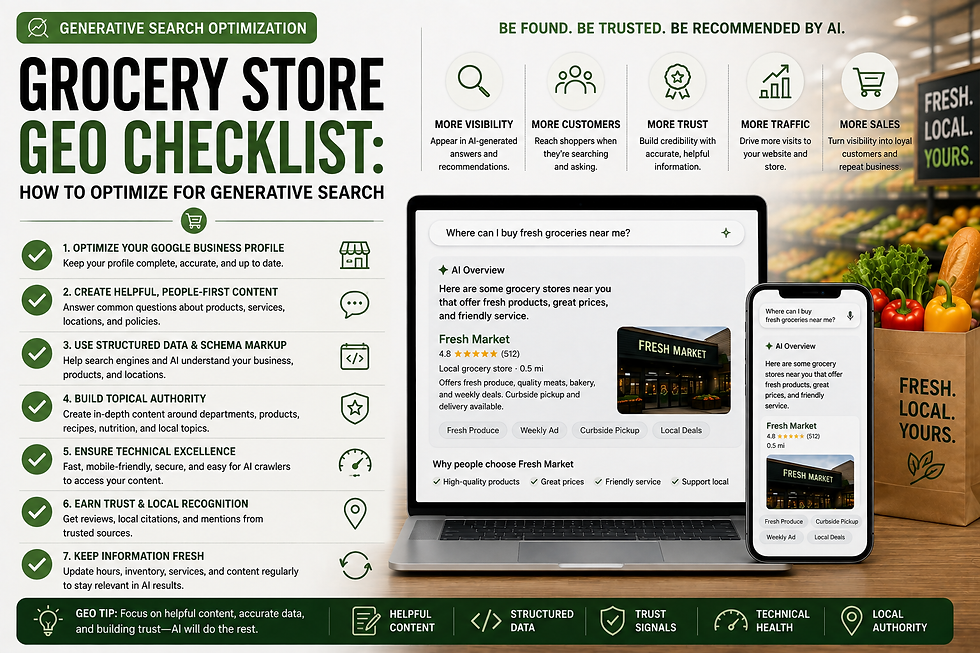
Generative search is changing how customers discover businesses.
Instead of only typing:
“grocery store near me”
a customer may ask:
“Which grocery store near me has a butcher counter, bakery, and curbside pickup?”
“What independent grocery store has the best international food selection in my area?”
“Which supermarket offers fresh seafood, prepared foods, and grocery delivery?”
These questions require search systems to understand much more than a business name or keyword.
They need to understand:
Who the grocery retailer is
Where its stores are located
Which departments exist
Which services each store offers
What differentiates the business
Whether the information is current
How all of those facts relate to one another
That is where Generative Engine Optimization, or GEO, becomes relevant.
But GEO should not be treated as a collection of hacks.
Google’s current guidance on generative AI Search explicitly says established SEO practices remain foundational, and it recommends concentrating on valuable, unique, non-commodity content rather than AI-specific tricks.
For grocery retailers, the best approach is therefore systematic.
This Grocery Store GEO Checklist provides a practical framework for strengthening the entire digital foundation of a grocery business for traditional search, local search, and emerging generative search experiences.
Table of Contents
What Is a Grocery Store GEO Checklist?
Start With the SEO Foundation
Establish a Clear Grocery Business Identity
Build Strong Location Pages
Document Departments Clearly
Document Grocery Services
Connect Locations, Departments, and Services
Strengthen Local Search Information
Answer Real Grocery Customer Questions
Publish Original Grocery Expertise
Improve Content Structure
Strengthen Internal Linking
Use Structured Data Correctly
Add Strong Visual Content
Build External Authority
Optimize Multi-Location Grocery Stores
Keep Business Information Current
Avoid GEO Myths and Shortcuts
Measure Generative Search Visibility
Complete Grocery Store GEO Checklist
Frequently Asked Questions
Final Thoughts
What Is a Grocery Store GEO Checklist?
A Grocery Store GEO Checklist is a systematic way to evaluate whether a grocery retailer's website and broader digital presence clearly communicate the information generative search systems may need to understand the business.
The objective is not merely to target an AI keyword.
It is to create a strong digital representation of the real grocery operation.
That includes:
Brand
↓
Locations
↓
Departments
↓
Services
↓
Promotions
↓
Expertise
↓
Local Information
↓
Authority
A strong GEO strategy makes these relationships clear.
GEO Begins With SEO
Before working through any AI-specific checklist, establish a strong SEO foundation.
Google's 2026 generative Search guidance says its generative AI features are rooted in its core Search ranking and quality systems, meaning traditional SEO fundamentals continue to matter.
Start here.
1. Technical SEO Foundation
Check the following:
Important pages are crawlable
Important pages are indexable
HTTPS is enabled
Website works correctly on mobile
Pages load quickly
XML sitemap is maintained
Broken links are fixed
Redirects work correctly
Canonical URLs are accurate
Important information is not hidden behind inaccessible technology
If search engines cannot reliably access the site, GEO optimization has a weak foundation.
2. Use Clear Website Architecture
Your grocery website should have a logical hierarchy.
For example:
Home
→ Locations→ Departments→ Services→ Weekly Ad→ Shop Online→ About→ Resources
For multi-location stores:
Locations
→ Downtown→ Northside→ Westside
Avoid making every important piece of information live on the homepage.
Create clear destinations.
3. Establish a Clear Grocery Business Identity
A generative search system should be able to determine basic facts about the retailer.
Check:
Official business name is consistent
Grocery format is clearly explained
Geographic markets are identified
Number or structure of locations is clear
Primary offerings are explained
Brand story is available
Business differentiators are documented
For example, instead of:
“We provide quality products for everyone.”
write something more specific:
“ABC Market is an independent grocery retailer serving three Tucson neighborhoods with fresh produce, full-service meat departments, bakery, deli, international foods, and curbside pickup.”
Specific information creates stronger context.
4. Build Strong Grocery Location Pages
Location pages are one of the most important components of grocery GEO.
Each physical store should generally have a dedicated webpage.
Check each store page for:
Store name
Address
Phone number
Regular hours
Holiday hours
Directions
Map
Departments
Services
Online ordering
Delivery availability
Pickup availability
Weekly ad
Original photos
Local information
Do not simply copy the same page for every store.
5. Represent Store Differences Accurately
GEO becomes much more useful when a website accurately distinguishes locations.
For example:
Store | Bakery | Seafood | Delivery | Pickup |
Downtown | Yes | Yes | Yes | Yes |
Northside | Yes | No | Yes | Yes |
Westside | Yes | No | No | Yes |
This makes it easier to answer a customer question such as:
“Which grocery store location has seafood and curbside pickup?”
Accuracy is more important than making every store look equally comprehensive.
6. Create Strong Department Pages
Major grocery departments can become important entities within the website.
Possible pages include:
Produce
Bakery
Deli
Meat
Seafood
Prepared Foods
Dairy
Frozen
International Foods
Natural & Organic
Floral
Check:
Important departments have clear descriptions
Actual products or specialties are explained
Participating stores are identified
Department services are explained
Real photos are included
Relevant store pages are linked
Customer questions are answered
Avoid creating a page for every aisle simply to increase page count.
Create department pages when there is enough real information to justify them.
7. Add Grocery-Specific Department Detail
Weak:
“Our bakery has delicious baked goods.”
Stronger:
“Our bakery prepares fresh bread, pastries, desserts, and custom cakes, with special orders available at our Downtown and Northside stores.”
The stronger example establishes:
Department → Products → Service → Locations
That relationship is useful for customers, SEO, and generative search.
8. Document Grocery Services
Services are another major part of the grocery knowledge structure.
Potential services include:
Grocery delivery
Curbside pickup
Online ordering
Catering
Custom cakes
Floral ordering
Pharmacy
Money services
Specialty ordering
For each important service, check:
What the service is
Which locations offer it
How customers use it
Relevant hours
Fees or requirements where applicable
Ordering process
Clear CTA
A simple icon that says Delivery is less useful than a page explaining how delivery actually works.
9. Connect Locations, Departments, and Services
This is one of the most important GEO checks.
Ask whether your website clearly establishes relationships such as:
Downtown Store
→ Bakery→ Seafood→ Deli→ Delivery→ Curbside Pickup
or:
Bakery
→ Downtown→ Northside→ Westside
These relationships should be reinforced through:
Internal links
Store pages
Department pages
Service pages
Navigation
Structured data where appropriate
Think of the website as a grocery information network.
10. Strengthen Google Business Profile Information
For physical grocery retailers, local information is essential.
Check each eligible store's Google Business Profile for:
Correct business name
Correct address
Correct phone number
Current hours
Holiday hours
Appropriate categories
Correct website page
Current store photos
Review monitoring
No unnecessary duplicate profiles
The website and Business Profile should reinforce one another rather than conflict.
11. Build a Single Source of Truth
For multi-location grocery operations, maintain a central record for information such as:
Field | Example |
Store Name | Downtown Market |
Address | 100 Main Street |
Phone | 555-555-1234 |
Hours | 7 AM–10 PM |
Bakery | Yes |
Seafood | Yes |
Delivery | Yes |
Pickup | Yes |
Weekly Ad | Store A |
Ordering URL | Store-specific URL |
Then use this same information consistently across:
Website
Google Business Profile
Ordering platforms
Directories
Social profiles
Other customer-facing systems
Consistency reduces conflicting information.
12. Answer Real Grocery Customer Questions
GEO benefits from useful answers.
Start with questions customers already ask.
Examples:
Store Questions
What time does the store close?
Is the store open on holidays?
Which location is closest?
Department Questions
Do you have a butcher?
Do you make custom cakes?
Which store has seafood?
Service Questions
Do you offer curbside pickup?
Can I order groceries online?
Is delivery available?
Product Questions
Do you carry organic products?
Do you sell international foods?
Do you carry halal meat?
Check:
Real questions have been identified
Answers are direct
Answers appear on relevant pages
Important answers are current
Answers do not make unsupported claims
13. Use Answer-First Formatting
For useful question sections:
Question
↓
Direct answer
↓
Additional detail
↓
Relevant CTA
Example:
Does the Downtown Store Offer Grocery Delivery?
Yes. Grocery delivery is available from the Downtown location through online ordering.
Customers can select a delivery window during checkout.
Start an Online Order →
Do not bury the answer beneath unnecessary introductory text.
14. Publish Original Grocery Expertise
Google's current guidance for generative AI Search emphasizes creating valuable, unique, non-commodity content.
Grocery retailers have a major opportunity here.
Their employees and operations contain information competitors cannot authentically reproduce.
Check whether the site contains original material such as:
Butcher expertise
Produce selection advice
Bakery ordering guidance
Seafood sourcing information
Local supplier stories
Seasonal merchandising insights
Specialty-product guides
Store-specific customer trends
Community information
15. Avoid Commodity Content
Generic topics can still be useful, but they should not dominate the strategy.
Examples of weak differentiation:
10 Healthy Grocery Shopping Tips
Why Fresh Produce Is Important
How to Make a Grocery List
Thousands of websites can produce this material.
Better:
How Our Produce Team Selects Watermelons
Our Butcher's Guide to Choosing a Steak
Most Popular Holiday Bakery Orders at Our Stores
Meet the Local Farm Behind Our Summer Tomatoes
These have a stronger connection to the actual business.
16. Add First-Hand Context
Whenever appropriate, answer:
Who knows this?
Why should someone trust the information?
For example:
“According to our meat department manager, who has worked as a butcher for 15 years…”
or:
“Our produce team evaluates melons based on…”
Only make expertise claims that are accurate.
Real experience strengthens content far more than generic statements such as:
“We are experts.”
17. Improve Page Structure
Check important pages for:
One clear H1
Descriptive H2 headings
Logical H3s
Short readable paragraphs
Useful lists
Tables where helpful
Direct answers
Relevant images
Context around visuals
Internal links
Do not artificially break every sentence into a separate section just because the content is intended for AI search.
Google specifically says there is no requirement to “chunk” content into tiny pieces for its generative Search features.
Structure content for customers first.
18. Strengthen Internal Linking
Internal links help create relationships throughout the site.
Check that:
Locations link to their departments
Departments link to participating locations
Services link to participating locations
Weekly ads connect to relevant stores
Blog posts link to relevant commercial pages
SEO articles link to supporting guides
Related resources link together naturally
Example:
Northside Store
→ Bakery→ Meat Department→ Curbside Pickup→ Weekly Ad
Internal links should be contextually useful rather than added solely to hit a target number.
19. Use Structured Data Appropriately
Potential schema types for grocery retailers include:
Organization
GroceryStore
LocalBusiness
BreadcrumbList
Article
Product, where appropriate
Check:
Structured data matches visible content
Business information is accurate
Location markup is location-specific
Breadcrumb schema matches site hierarchy
Article schema is used appropriately
Invalid or misleading schema is avoided
Google explicitly says there is no special schema required for generative AI Search and warns against overfocusing on structured data as a GEO shortcut.
20. Optimize Grocery Images
Useful visual information can strengthen the website experience.
Check:
Storefront photos
Produce imagery
Meat department imagery
Bakery imagery
Seafood imagery
Deli imagery
Specialty department imagery
Staff images where appropriate
Community photos
Local supplier photos
For each website image:
Descriptive filename
Natural alt text
Compressed file size
Mobile-friendly dimensions
WebP where appropriate
Relevant placement
Original imagery is generally preferable to filling every page with generic grocery stock photos.
21. Build Authority Beyond Your Website
Your business does not exist only on your own domain.
Legitimate external relationships can strengthen your overall digital presence.
Potential sources include:
Local newspapers
Chambers of commerce
Community organizations
Food banks
Local farms
Suppliers
Industry associations
Schools
Charities
Event websites
Local publications
Check:
Business listings are accurate
Legitimate partnerships are documented
Local media coverage is linked where appropriate
Supplier relationships are represented accurately
Community involvement appears online
Reviews are monitored
Do not manufacture mentions simply for GEO.
Google specifically warns that inauthentic mentions are not a useful generative Search strategy.
22. Build Legitimate Review Signals
Customer reviews can provide useful third-party context about the business.
Check:
Reviews are regularly monitored
Customers have a legitimate way to leave reviews
Review requests do not violate platform policies
Negative reviews receive professional responses
Recurring review themes are analyzed
No fake reviews are purchased
Reviews are useful not because they are an AI hack, but because they are part of the broader digital reputation of a local retailer.
23. Optimize Multi-Location Grocery Architecture
For a multi-location operator, check whether the website follows a logical hierarchy.
For example:
Brand
↓
Markets / Regions
↓
Locations
↓
Departments
↓
Services
↓
Weekly Ads
↓
Local Content
Each individual store should remain clearly distinguishable.
24. Avoid Multi-Location Duplication
Check that location pages do not simply swap:
City A
for:
City B
while keeping everything else identical.
Instead, include genuine differences such as:
Departments
Services
Hours
Store photography
Neighborhood information
Ordering options
Promotions
Store-specific features
Do not invent differences merely for SEO.
Represent the real operation.
25. Keep Weekly Ads Connected to Stores
Weekly ads are particularly important for grocery businesses.
Check:
There is a stable Weekly Ad destination
Effective dates are clear
Applicable stores are identified
Store-specific ads are properly connected
Expired ads are handled appropriately
Important promotion information is not available only as unreadable imagery
Mobile viewing works correctly
Weekly promotions can help create current, useful information about the grocery business.
26. Keep Business Information Updated
GEO is not a one-time project.
A website can become inaccurate quickly.
Check regularly:
Weekly
Weekly ad
Promotions
Monthly
Department changes
Service changes
Store information
Broken links
Seasonally
Holiday hours
Seasonal offerings
Special ordering information
When Changes Occur
Store openings
Closures
Remodels
New services
New departments
Ordering-provider changes
Accuracy is essential.
27. Avoid GEO Myths
A strong grocery GEO checklist should also include what not to spend time on.
For Google Search, you generally do not need:
llms.txt as a Google visibility tactic
Special GEO schema
Artificial content chunking
Hundreds of long-tail variations
AI-specific rewriting of every existing page
Manufactured mentions
Keyword stuffing for AI
Separate “AI pages” for every offering
Google's 2026 guidance explicitly addresses these misconceptions. It says Google Search ignores llms.txt, does not require special AI markup or schema, does not require artificial chunking, and does not require rewriting content solely for AI systems.
28. Do Not Mass-Generate Thin GEO Pages
Avoid creating hundreds of pages such as:
/best-grocery-store-for-ai-search
/best-supermarket-for-chatgpt
/grocery-store-ai-near-me
if they provide no genuine value.
Google's spam policies prohibit scaled content abuse where large volumes of low-value content are created primarily to manipulate rankings or Search's generative AI responses.
Build fewer, stronger pages around actual grocery topics and customer needs.
29. Measure Traditional Search Performance
GEO does not eliminate standard measurement.
Track:
Organic impressions
Organic clicks
Keyword visibility
Location-page traffic
Department-page traffic
Service-page traffic
Weekly-ad traffic
Local search visibility
These remain important indicators of whether your digital foundation is improving.
30. Measure Generative Search Visibility
Where measurement is available, also monitor:
Generative AI impressions
Pages appearing in AI search experiences
AI referrals
Query themes
Brand mentions
Pages frequently surfaced
Changes over time
Google introduced dedicated Search Generative AI performance reports in Search Console in June 2026, initially rolling them out to a subset of websites.
Do not rely on manually asking one AI platform the same question repeatedly.
31. Measure Grocery Business Outcomes
Ultimately, GEO should support the business.
Track actions such as:
Store locator use
Directions
Calls
Weekly-ad views
Shop Online clicks
Delivery orders
Pickup orders
Catering inquiries
Custom-cake inquiries
Loyalty registrations
A citation or AI mention is not valuable simply because it exists.
What matters is whether stronger visibility helps customers discover and use the grocery business.
Complete Grocery Store GEO Checklist
A. SEO Foundation
Website crawlable
Important pages indexable
Mobile-friendly
Fast-loading
HTTPS
XML sitemap
Clean URLs
Accurate canonicals
Broken links fixed
Logical navigation
B. Business Identity
Business name clear
Grocery format explained
Geographic markets identified
Brand differentiators documented
About page
Real business information
C. Locations
Dedicated location pages
Address
Phone
Hours
Holiday hours
Directions
Map
Store photos
Departments
Services
Weekly ad
Ordering options
D. Departments
Major departments documented
Offerings described
Participating stores identified
Specialty offerings included
Original department photos
Related location links
E. Services
Delivery
Pickup
Online ordering
Catering where applicable
Custom cakes where applicable
Pharmacy where applicable
Specialty services
Availability by store
Clear instructions
F. Local Search
Google Business Profiles accurate
Correct business names
Correct addresses
Correct phone numbers
Current hours
Holiday hours
Correct website URLs
Store-specific photos
Reviews monitored
G. Customer Questions
Common questions identified
Direct answers provided
Answers placed on relevant pages
Answers current
No unnecessary thin FAQ pages
H. Original Content
Employee expertise
Department expertise
Local supplier information
Original store insights
Seasonal information
Community content
Non-commodity educational content
I. Content Structure
Clear H1
Descriptive H2s
Useful H3s
Short paragraphs
Tables where appropriate
Lists where appropriate
Direct answers
Internal links
J. Authority
Legitimate local mentions
Supplier relationships
Community partnerships
Industry relationships
Review presence
No purchased fake mentions
K. Structured Data
Organization markup where appropriate
GroceryStore/LocalBusiness markup
BreadcrumbList
Article schema on articles
Product markup where genuinely applicable
Schema matches visible content
No fake GEO schema
L. Images
Original photography
Descriptive filenames
Natural alt text
WebP where appropriate
Compressed
Mobile optimized
M. Multi-Location
Individual stores distinguished
Department differences represented
Service differences represented
Store-specific URLs
Store-specific Business Profiles
Store-specific weekly ads where applicable
No mass duplicate location pages
N. Maintenance
Weekly ads updated
Hours reviewed
Holiday hours updated
Services reviewed
Department information reviewed
Broken links checked
Expired promotions removed or managed
O. Measurement
Search Console monitored
Organic visibility tracked
Location traffic tracked
Department traffic tracked
AI visibility reviewed where available
Business actions measured
Frequently Asked Questions
What is a Grocery Store GEO Checklist?
A Grocery Store GEO Checklist is a framework for evaluating whether a grocery retailer's website and digital presence clearly communicate its business identity, locations, departments, services, expertise, and local information for generative search.
What does GEO mean for grocery stores?
GEO stands for Generative Engine Optimization.
For grocery retailers, it generally means improving the quality and clarity of digital information so generative search systems can more easily understand the business and its offerings.
Should grocery stores do GEO before SEO?
Usually not.
Start with strong SEO fundamentals, local search, website architecture, and accurate business information.
Then build GEO considerations on top.
Google itself currently frames work intended for its generative Search features as part of SEO rather than a separate requirement.
What are the most important GEO elements for grocery stores?
A strong starting priority is:
1. Accurate business information2. Individual location pages3. Department pages4. Service pages5. Local SEO6. Original grocery expertise7. Strong internal linking8. External authority
Do I need special schema for GEO?
No.
There is no special GEO schema required for Google's generative Search features. Continue using appropriate structured data as part of your normal SEO strategy.
Does my grocery store need an llms.txt file?
Not for Google.
Google says llms.txt does not help or hurt visibility or rankings in Google Search because Google Search ignores it. Other systems may choose to use similar files, but it should not be a priority for Google-focused GEO.
Should I create hundreds of pages for AI search questions?
No.
Build comprehensive pages around real topics such as locations, departments, services, and customer needs rather than creating pages for every wording variation.
Google warns against scaled low-value content created primarily to manipulate Search or generative AI responses.
How often should a grocery GEO strategy be updated?
Operational information should be updated whenever it changes.
Weekly ads may change weekly, holiday hours seasonally, while broader content and SEO performance can be reviewed periodically.
GEO is best treated as an ongoing digital-quality process rather than a one-time optimization.
How can grocery stores measure GEO?
Measure both search visibility and business outcomes.
Track organic Search, local performance, location-page traffic, department traffic, AI referrals or generative visibility where available, plus calls, directions, weekly-ad usage, and online orders.
Final Thoughts
The most effective Grocery Store GEO Checklist is not a list of AI tricks.
It is a checklist for building a better digital representation of the grocery business.
A generative search system should be able to understand:
Who you are.
Where your stores are.
When they are open.
Which departments they have.
Which services they offer.
What makes them different.
What your employees know.
How your information connects.
Why your business can be trusted.
That starts with SEO.
Then it expands through:
Local information.
Location architecture.
Departments.
Services.
Original content.
Internal relationships.
External authority.
Accurate ongoing maintenance.
Google's current generative Search guidance supports essentially this direction: keep using strong SEO fundamentals, create valuable and differentiated content, maintain useful local and visual information, and avoid unsupported GEO shortcuts.
For grocery retailers, the objective should not be:
“How do we trick AI into mentioning us?”
It should be:
“How do we create the clearest, most useful, and most trustworthy digital representation of our grocery business?”
Do that well, and the same foundation can strengthen visibility across:
Traditional SEO
Local Search
Google AI Overviews
AI Mode
Answer engines
Generative search
and future search experiences that have not yet emerged.
Need Help Completing Your Grocery Store GEO Checklist?
Grocery Growth helps grocery retailers build the digital infrastructure needed for traditional and emerging search.
Our grocery-focused approach can include:
Grocery website design
SEO
Local SEO
GEO
AEO
LLM optimization
AI-search optimization
Location-page architecture
Department pages
Service pages
Weekly-ad integration
Google Business Profile strategy
Original grocery content
Ongoing website growth
Rather than layering AI tactics onto a weak website, Grocery Growth can build the underlying grocery-specific structure first.
Explore Grocery Growth's website and search solutions to strengthen your grocery store for both traditional and generative search.
Written by Grocery Growth
Grocery Growth helps independent grocery stores, supermarkets, specialty markets, and multi-location grocery retailers strengthen their digital presence through grocery-focused website design, SEO, local search optimization, GEO, AEO, LLM optimization, AI-search strategy, and educational resources.
Related Articles
GEO & AI Search
GEO for Grocery Stores
GEO vs SEO for Grocery Stores
Grocery AI Search Optimization
Google AI Overviews for Grocery Stores
AEO for Grocery Stores
LLM Optimization for Grocery Stores
SEO
Grocery Store SEO Guide
Independent Grocery Store SEO
Supermarket SEO
Local SEO for Grocery Stores
How to Rank a Grocery Store on Google
Website & Local Infrastructure
Google Business Profile for Grocery Stores
Supermarket Website Design
Independent Grocery Store Website Design
Grocery Store Website Checklist
Comments